


Jgraph
Jgraph
$ jgraph in.jgr > out.eps[Invio]$ jgraph -P in.jgr > out.ps[Invio]$ cat in.jgr | jgraph -P | ps2eps -f -l -q > out.eps[Invio]
newgraphnewcurvepts
6.1
Listato 6.1. Jgraph: un esempio elementare.
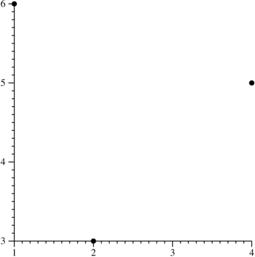
(* Simple jgraph *) newgraph newcurve pts 2 3 4 5 1 6 |
Figura 6.2.
|
marktypelinetypenewlinenewcurve marktype none linetype solid
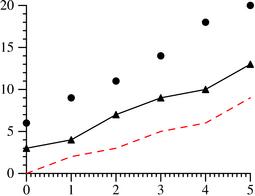
Listato 6.3. Jgraph: un grafico con tre curve di tipo differente.
      1 newgraph
      2 xaxis size 2
      3 yaxis size 1.5
      4
      5 newcurve pts 0 6  1 9  2 11  3 14  4 18 5 20
      6 newcurve marktype triangle linetype solid
      7          pts 0 3  1 4  2 7  3 9  4 10 5 13
      8 newcurve marktype none linetype dashed color 1 0 0
      9          pts 0 0  1 2  2 3  3 5  4 6  5 9
|
Figura 6.4.
|
- la pagina;
- i grafici;
- gli assi;
- le curve;
- le stringhe;
- le legende.
ptsnewcurve pts 0 0 1 1 2 2newcurve pts 0 0 pts 1 1 pts 2 2
include nome_file
Gestione degli assi.
Tabella 6.5. Jgraph: alcuni attributi degli assi.
| Attributo ed eventuali valoriSignificato |
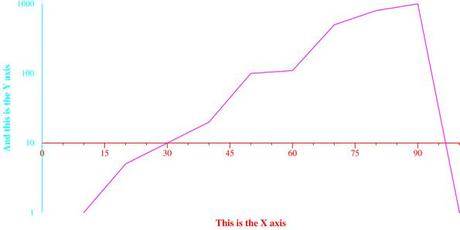
Listato 6.6. Jgraph: uso di alcuni degli attributi degli assi.
newgraph

xaxis
  size 6
  min 0 max 100
  hash 15 mhash 2 (* i.e. minor hashes at the 5's and 10's *)
  color 1 0 0
  label : This is the X axis
  draw_at 10

yaxis
  size 3
  min 1 max 1000
  log
  no_draw_hash_marks
  label : And this is the Y axis
  color 0 1 1

newline color 1 0 1
  pts 10 1
      20 5
      30 10
      40 20
      50 100
      60 110
      70 500
      80 800
      90 1000
      100 1
|
Figura 6.7.
Gestione delle curve. |
copycurve
cfill
Listato 6.8. Jgraph: esempio di gestione delle curve.
newgraph xaxis min 0 max 10 size 7 yaxis min 0 max 10 size 4 newcurve marktype box marksize 1.5 1 linetype solid cfill 1 0 0 pts 1 3 2 5 3 1 4 8 copycurve marktype ellipse cfill 1 0 .5 pts 6 3 7 5 8 1 9 8 |






 Pacman
 Nostradamus
 Magical Cat Adventure
 Snake
Snake